 AI Essay

Free browser tool
Make a simple HTML table
Paste CSV or tab-separated data, name the table and choose its header cells. Your data stays in this browser tab.
Add a caption and paste a rectangular table to preview it.
Preview
No table yet.
Wide tables scroll horizontally inside this preview.
After parsing, the table preview appears here.
HTML markup
Generated markup will appear here.On this page
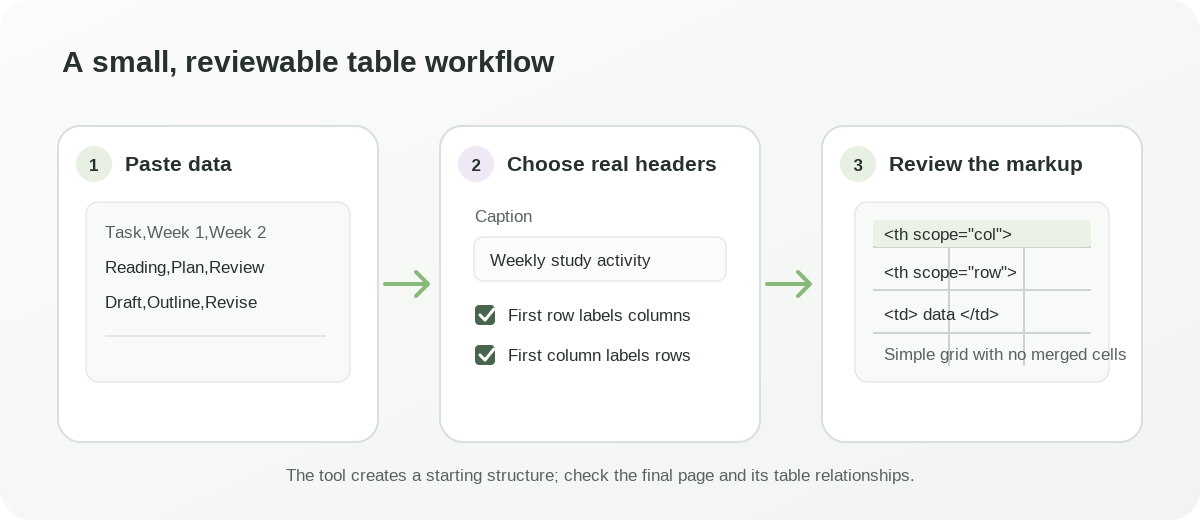
Build a simple data table from CSV or tabs
Paste rows from a spreadsheet or a plain-text CSV/TSV file. Choose automatic detection, comma-separated values or tab-separated values. The preview updates in this tab. The input is limited to 80,000 characters, 200 rows and 24 columns so large datasets can be split and handled in smaller, reviewable pieces.
CSV cells may be quoted when they contain commas, quotation marks or line breaks. Inside a quoted cell, write a literal quotation mark twice. Every row must have the same number of cells; the generator reports an uneven row rather than silently filling or dropping values. Blank cells are allowed.
Mark only the cells that act as headers
A caption briefly identifies the table’s topic. It is separate from the first row: the caption describes the whole table, while headers label data relationships. Add your own caption rather than relying on the tool to guess what the values mean.
Select the first row when it labels columns, the first column when it labels rows, or both when the grid has both relationships. Leave each option clear when those cells are ordinary data. The generated markup uses <code><th scope="col"></code> for column headers and <code><th scope="row"></code> for row headers. When both are selected, a non-empty top-left cell is retained as the label for the row-header column; leave it blank when no such label applies.
Review the preview and generated HTML
Check the caption, header choices, spelling, number formatting and every row against your original data. Then copy the markup or download an HTML fragment. The tool escapes text so values such as <code><script></code> display as text instead of becoming page markup.
After placing the table in a page or learning platform, test the published copy with the keyboard and assistive technology available to you. Confirm that the header labels make sense when navigating cells and that the caption is useful out of context. A correct-looking preview does not validate the destination page or its entire accessibility.
Know when this simple table pattern is not enough
This generator handles a rectangular data grid with optional single-level row and column headers. It does not create merged cells, row or column groups, multiple header rows, nested tables, sortable controls or a complete document. Do not force complex information into this pattern if the relationships become unclear; use simpler tables or prose where appropriate.
W3C guidance describes additional markup for irregular and multi-level relationships, including grouped headers or explicit header associations. The generator does not claim WCAG conformance and does not replace review against your institution’s requirements or the actual page where the table will appear.
Questions about this topic
How do I turn CSV into an HTML table?
Paste comma-separated or tab-separated rows, add a caption, and choose whether the first row or first column contains headers. The generator previews a simple table and provides the corresponding HTML to copy or download.
Does this generator upload my data?
No. Parsing, preview and markup generation happen in this browser tab. The tool does not send the pasted table to a server or save it automatically. Avoid entering private or sensitive data on a shared device.
Does the generated table guarantee accessibility or WCAG conformance?
No. The generator adds basic table structure and explicit header scope for a simple grid. It cannot determine whether the caption is meaningful, the chosen cells are truly headers, the content is understandable, or a particular use conforms to an accessibility standard.
Can I make a table with merged or multi-level headers?
This tool is limited to a rectangular table with one optional header row and one optional first-column header. Grouped, merged, irregular or multi-level relationships need a deliberate structure using additional markup such as header IDs and associations; review the W3C tables tutorial or build that markup manually.
Sources and editorial notes
The supporting reading below informs our editorial guidance. Exercises and scenarios illustrate a method; they do not report a completed product test or measured learning outcome. Read our editorial policy or send a correction with a supporting source to info@ai-essay.com.