 AI Essay

On this page
Free, local MLA 9 formatting tool
Format a student paper
Add your first-page details and plain-text paragraphs. Download an editable RTF with a Works Cited page if you supply checked entries.
Plain text only. Paragraph breaks are kept; styling, tables, images, footnotes and existing page breaks are not.
Add a Works Cited page (optional)
Entries are preserved as entered. The tool does not create, sort or verify citations.
Your text stays in this browser tab. It is not uploaded or saved. The RTF is editable and should be inspected in your word processor before submission.
First-page preview
Approximate layout · page 1
Your name
Instructor name
Course name or number
Submission date
Paper title
Your first paragraph will appear here.
Format an MLA student paper
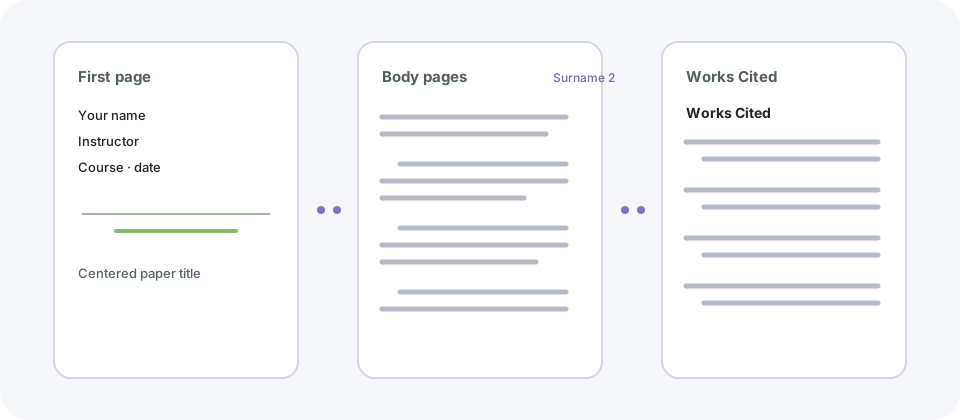
Enter your name, instructor, course, date and paper title. Paste the body with a blank line between paragraphs. The formatter creates an editable RTF with one-inch margins, a readable 12-point Times New Roman face, double spacing, half-inch first-line paragraph indents, the first-page course heading, and a running header with your surname and a live page-number field. Keep the first-page header on or turn it off to match your instructor’s directions. It can append a Works Cited page from entries you have already checked.
The preview is an approximate first-page view, not a page-by-page rendering. Open the RTF in Word or another compatible word processor, check page breaks and header placement, and follow any different instructions from your teacher or institution.
Supporting reading: [1]
What the formatter preserves—and what to check
The tool treats each paragraph as plain text. It does not preserve bold or italic styling, tables, images, footnotes, endnotes, section headings, or existing page breaks from a source document. It does not correct MLA citations, sort Works Cited entries, or confirm that a source exists. When you only need to lay out an existing Works Cited list, use the dedicated page formatter.
The MLA Style Center says that instructors’ requirements take precedence when they specify a different format. Check the required edition and course rules, then inspect the downloaded file before submitting it.
Supporting reading: [1]
Questions about this topic
Can I omit the running header from the first page?
Yes. The option starts with the header shown on page 1. Some instructors prefer no first-page running header; follow the requirements for your assignment.
What does the MLA paper formatter put in the first-page heading?
It provides fields for the writer’s name, instructor, course, date and paper title. The common MLA student-paper pattern uses the name, instructor, course and date at the upper left, followed by a centered title; check your instructor’s directions.
Does this tool format citations or check my Works Cited entries?
No. It applies document layout to the text you provide. It does not generate or verify citations, alphabetize entries, or check whether a source supports a claim.
Can I upload a Word document?
No. Paste plain text with blank lines between paragraphs. Formatting such as italics, tables, images and footnotes is not preserved.
Are my paper and course details uploaded?
No. The preview and RTF file are created in this browser tab. The page does not send or save the text you enter.
Sources and editorial notes
The supporting reading below informs our editorial guidance. Exercises and scenarios illustrate a method; they do not report a completed product test or measured learning outcome. Read our editorial policy or send a correction with a supporting source to info@ai-essay.com.