 AI Essay
On this page
Free, local formatting tool
Format a Chicago bibliography
Paste one complete Chicago Notes and Bibliography entry per line. Preview the page and download an editable RTF with a hanging indent.
The text stays in this browser tab. It is not uploaded or saved.
The formatter preserves your input order and wording. Check source details and alphabetization yourself.
Page preview
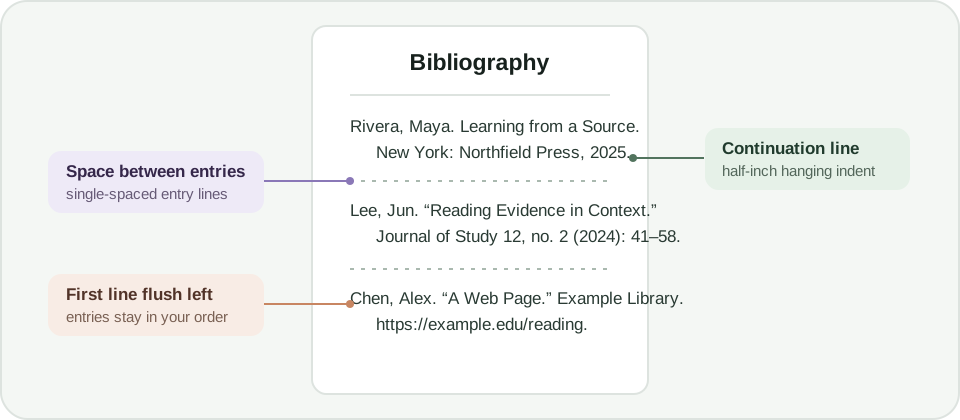
Bibliography · single-spaced entries · hanging indent
Bibliography
Your formatted entries will appear here.
Format a Chicago bibliography page
Paste one complete Chicago Notes and Bibliography entry per line. The preview and RTF use one-inch margins, a centered Bibliography heading, single spacing within entries, space between entries and a half-inch hanging indent. The tool preserves your wording and input order.
Chicago bibliography entries generally invert the first author’s name, while later authors remain in normal order. Do not treat the formatter as a citation generator: it does not identify source types, add missing publication details, italicize titles or verify that a source exists. Check each entry against the current Chicago guidance and your course instructions.
What the formatter does and does not check
The tool applies page layout only. It does not alphabetize entries, correct punctuation, check capitalization, match notes to bibliography entries, or confirm that a reference supports a claim. Sort the entries yourself using the required rules, compare them with the source record, and inspect the downloaded file in a word processor.
Chicago has Notes and Bibliography and Author-Date systems, with different citation details and list conventions. This page formats a Bibliography page for the Notes and Bibliography system. Follow your instructor’s requested system and local formatting directions.
Questions about this topic
Does this tool generate or verify Chicago citations?
No. It formats complete entries you supply. It does not generate missing details, identify a source type, verify a DOI or URL, or match notes in your paper to bibliography entries.
Does it alphabetize the entries?
No. The formatter preserves your input order. Arrange the entries according to Chicago guidance and your instructor’s directions before downloading.
What does the downloaded file include?
An editable RTF with a centered Bibliography heading, one-inch margins, single-spaced entries, space between entries and a half-inch hanging indent. Open and inspect it in your word processor.
Are my references uploaded?
No. The preview and RTF are created in your browser. This page does not send or save the text you enter.
Sources and editorial notes
The supporting reading below informs our editorial guidance. Exercises and scenarios illustrate a method; they do not report a completed product test or measured learning outcome. Read our editorial policy or send a correction with a supporting source to info@ai-essay.com.