 AI Essay
On this page
Free, local Chicago 18th-edition tool
Build a first note, short note and bibliography entry
Choose a book or journal article and enter its checked source details. The examples update in this browser.
Enter only the locator as it appears in the source, without “p.” The builder does not add a footnote number.
The first author’s family name is used to invert the bibliography entry. Check name order, punctuation, italics and every source detail yourself.
Enter the source details to build the three citation forms.
Citation examples
Your note and bibliography examples will appear here.
Choose Chicago Notes and Bibliography
Chicago offers two citation systems. Notes and Bibliography uses numbered footnotes or endnotes linked to raised numbers in the text, usually with a separate bibliography. Author-Date instead uses parenthetical author and year citations with a reference list. This tool builds the Notes and Bibliography pattern only; follow the system your instructor or publisher requires.
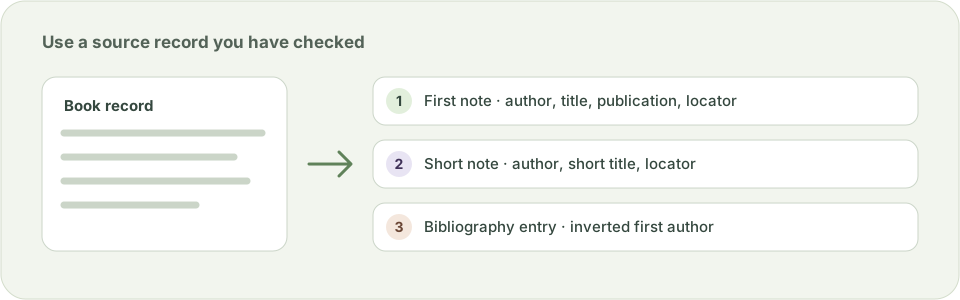
For a supported book or journal article, enter the source record, then compare the first note, shortened note and bibliography entry as a set. The note identifies a particular passage when you add a page locator. Your word processor inserts and renumbers the footnote or endnote marker; this builder does not place a marker in your paper.
Build notes for books and journal articles
For books, the first note places the author and italicized title before the publisher and year; a shortened note uses the author’s family name and the short title. The bibliography entry inverts the first author’s name. Chicago’s 18th-edition examples no longer require a place of publication for books. For a journal article, the note includes its title, journal, volume, optional issue, year and any page you consulted; the bibliography uses the article’s full page range or article number.
Enter the first author’s family name explicitly so the bibliography can invert that name without guessing at compound surnames. If a source has an edition, add it exactly as shown in its record. A journal DOI or URL is included only when you supply an HTTPS link. Short titles are your choice: keep enough words to distinguish works by the same author.
Check each generated form against the source
This is a formatter for supplied metadata, not a source finder. It supports one or two individual authors and two source types. It does not create citations for chapters, web pages, reports, archives, edited collections or sources with more than two authors; it does not verify a title, author, DOI, page range or quotation. For an unsupported source, use Chicago’s examples directly instead of forcing the details into a book or article form.
Copy each result into the right place in your document, then inspect italics, quotation marks, punctuation and the page locator in your word processor. Use the companion formatter for a complete bibliography page; it applies page layout but does not sort or correct entries.
Keep citation details in this browser
The builder creates examples in the current browser tab. It does not look up, upload or save the names or source details you enter. Clear the fields when you finish, especially on a shared device.
Questions about this topic
Does this Chicago tool create a first note and a shortened footnote?
Yes. For a supported book or journal article, it formats a first note, a shortened repeat note and a bibliography entry from the details you enter. Add the actual footnote or endnote number in your document editor.
Does the builder follow Chicago 18th edition?
It follows a narrow set of patterns from Chicago’s current Notes and Bibliography examples for books and journal articles. Check the official guide and your instructor’s requirements, particularly for unusual sources or local variations.
Does it support websites, book chapters or more than two authors?
Not in this version. It accepts one or two individual authors and a book or journal article. Use Chicago’s source-specific examples for websites, chapters, reports, edited collections and longer author lists.
Does the tool verify sources or look up a DOI?
No. It formats only the metadata you supply. It does not search for a source, resolve a DOI, verify page numbers or confirm that the citation supports a claim.
Are my citation details uploaded?
No. The examples are generated in your browser and the tool does not upload or save the text you enter.
Sources and editorial notes
The supporting reading below informs our editorial guidance. Exercises and scenarios illustrate a method; they do not report a completed product test or measured learning outcome. Read our editorial policy or send a correction with a supporting source to info@ai-essay.com.