 AI Essay

On this page
Local research-data tool
Describe variables before you analyze them
Record what each column means, how values are coded, which cases it applies to and how derived values were made. Export a codebook, then optionally inspect a CSV’s structure in this tab.
Review question drafts from the questionnaire tool
These are editable variable drafts. Choose the data type yourself after checking the instrument and response format. Response options remain notes; no values, categories, codes, pretest findings or participant data are imported.
Inspect a CSV against this dictionary
Choose a file to compare its headers, row widths, explicitly entered category codes, numeric types and numeric bounds. The file stays in this tab; only aggregate counts are shown. The missing-value profile counts blank cells and values matching the missing codes you declared; unclassified nonblank values are not treated as valid. The denominator is the number of parsed nonempty data rows, including rows with malformed widths; missing trailing cells count as blank. Empty rows are excluded. Do not use identifiable or confidential records.
Structural check summary
Missing-value profile
Add variable definitions from your data collection instrument or approved study documentation. No automatic saving.
Your data stays in this browser tab. There is no upload or automatic save. CSV contents are checked in memory; the tool reports counts and does not display, correct or store cell values. Download a backup before leaving if you want to keep your dictionary.
What a data dictionary records
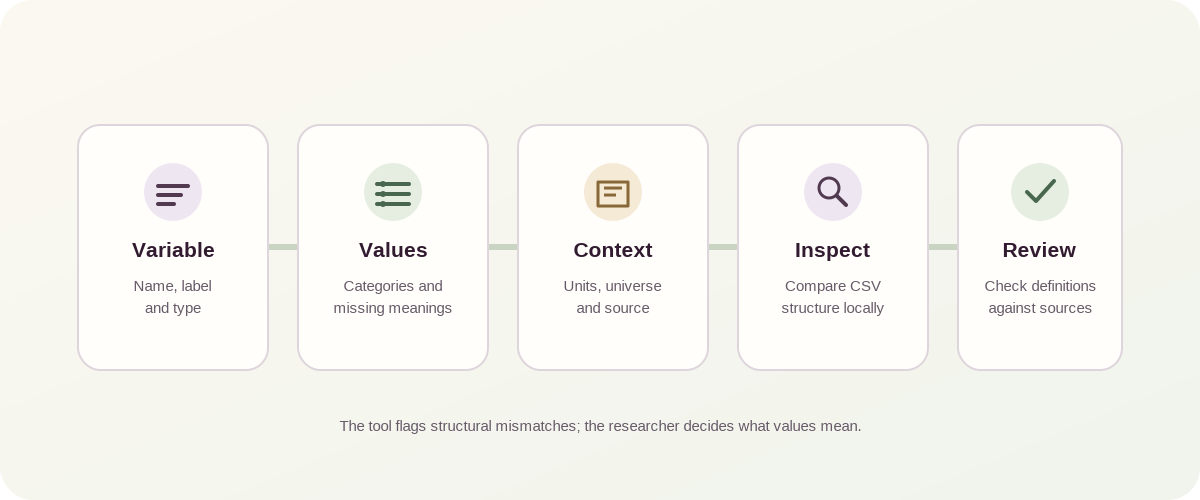
A data dictionary explains how to read a dataset at the variable level. For each column, record a stable variable name, a plain-language label, the data type, units where relevant, categories and their meanings, the cases to which the variable applies, and its source in the instrument or study documentation. A codebook may also document constructed variables and the rule used to derive them.
A number does not explain itself. A value of 7 could mean a real quantity, a response category, “not asked” or something else. The label and coding rules establish its meaning. UK Data Service guidance highlights units, value labels, missing-data distinctions, applicability and derived-variable rules as parts of tabular data documentation.
Separate categories from missing or non-response codes
List valid response categories separately from non-response codes, and write what each code means. “Not asked,” “not known,” “declined” and a blank cell can represent different situations. Do not combine or reinterpret them just because a spreadsheet or analysis package uses the same numeric field for all of them. Follow the actual questionnaire and study documentation.
The builder accepts one value and label per line. The categories and missing codes are your declarations, not values inferred by this tool. If a question allowed multiple responses or used a complex skip pattern, describe that in the applicability field rather than assuming a single code list captures the design.
Document constructed variables and version changes
If a column was recoded, combined, calculated or otherwise constructed, record the inputs and the reproducible rule. Give the dictionary a version and keep it aligned with the corresponding dataset and instrument. A label such as “total score” is not enough to reconstruct a result if the included items, reverse coding or missing-item rule are unstated.
Keep separate versions when the question, coding or transformation changes. Do not silently revise an old definition to match a newer file. Add a note identifying the version or source record that the definition describes, and retain the exact course, study or repository documentation that governs the work.
Inspect a CSV without changing its values
The optional local check compares the first row’s column names with the dictionary, identifies duplicate or blank headings and uneven row widths, and counts values that do not match categories or numeric ranges you entered. It also summarizes blank or whitespace-only cells and the user-declared missing codes for each matched variable. The denominator is the number of parsed nonempty data rows; empty rows are excluded and a missing trailing field in an uneven row counts as blank. Other nonblank cells may still be undeclared or outside entered bounds, so this is not a valid-case count or a data-quality score.
ICPSR recommends distinguishing different missing-data situations with documented codes and showing both valid and missing cases in unweighted frequency distributions. The browser summary keeps blank cells separate from the missing-code labels you entered, and its downloadable aggregate CSV preserves the row denominator and the meaning labels you supplied without including cell values. It cannot determine why a response is missing: a blank may reflect an error, an unrecorded response or a documented skip pattern. Interpret counts with the study’s questionnaire, universe and processing history; do not infer or impute a reason from this profile.
The check does not display individual cells, repair headers, convert strings to numbers, impute missing data or decide whether an unexpected value is an error. Review each count against the original data and study documentation.
Use a UTF-8 comma-separated text file with one header row and the same number of fields in each record. Quoted fields may contain commas, line breaks or escaped quotation marks. The checker has explicit size and row limits; spreadsheets and other archive formats must be exported as CSV first. Leading zeros and date-like strings remain text unless a variable is explicitly declared as numeric for a structural check.
The CSV is processed in the current tab and is not sent to the site. That does not determine whether the file is anonymous, safe to share or permitted by your institution. Avoid names, IDs, combinations that could identify people, free-text answers and confidential records. Follow your ethics approval, data-management plan and institutional rules before selecting a file. The JSON backup preserves your exact dictionary text. The spreadsheet-oriented CSV export uses an Excel-specific tab prefix for cells beginning with formula characters and a text marker for other control or locale-specific prefixes. Spreadsheet programs vary, and some can remove escapes when a CSV is saved and reopened; review this export before using it. The added prefix characters may also affect later programmatic imports. OWASP documents both this trade-off and the lack of one universal CSV sanitization strategy.
Keep documentation beside the dataset
A codebook helps another reader understand the file without relying on the original analyst’s memory. Keep the variable definitions, instrument version, dataset version and transformation notes together in the locations required by your research team or repository. For qualitative transcript analysis, a coding scheme serves a different methodological purpose; use a qualitative codebook only when the selected approach calls for one.
Questions about this topic
What is the difference between a codebook and a data dictionary?
The terms overlap in practice. Both can explain variables, labels, categories and missing-value codes. A codebook may also include study or file structure, record layout, frequencies or broader notes. Match the format to your discipline, assignment or repository.
Can this tool tell me why a value is missing?
No. It counts blank cells and values matching missing codes that you declared. A missing value may reflect several different situations, including a question that did not apply or was not asked. Check the instrument, documented universe and study records before interpreting any count.
Does the missing-value profile count only valid cases?
No. “Other nonblank” means a cell was not blank and did not match one of your declared missing codes. That count can include undeclared values or values outside entered bounds. Review structural findings before treating any count as valid. The optional CSV export contains only aggregate counts, labels and the denominator, not cell values.
Does the CSV checker clean or validate my data?
No. It reports structural differences such as unmatched headers, undeclared category values, numeric-format issues and user-entered bounds, plus aggregate blank and declared-missing counts. It does not correct, remove, impute or interpret a value, or certify that the dataset is ready to analyze.
Is my CSV uploaded or saved?
The file is read in the current browser tab for the optional structural check and is not uploaded or automatically saved. Avoid confidential or identifying records, follow your institutional rules, and remember that a file download creates a separate copy you control.
Can I use this as a qualitative codebook?
This tool documents quantitative dataset variables and their values. Qualitative coding schemes define analytic codes and boundaries for interpreting text; that is a different method and is covered by the qualitative interview coding worksheet.
Sources and editorial notes
The supporting reading below informs our editorial guidance. Exercises and scenarios illustrate a method; they do not report a completed product test or measured learning outcome. Read our editorial policy or send a correction with a supporting source to info@ai-essay.com.