 AI Essay

Free browser tool
Choose the right text alternative
Select the image’s role, write what the reader needs, and review the HTML draft before using it.
Local processing: your text stays in this browser tab. Nothing is uploaded or saved automatically.
Choose the image’s role before drafting its alternative.
Reviewable draft
Recommendations will appear here after you prepare a draft.
Choose a role and enter the information a reader needs.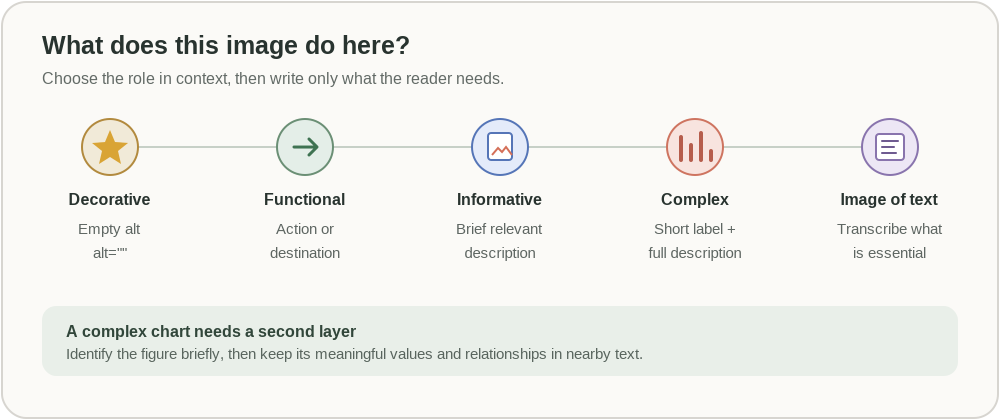
On this page
Choose alt text by the image’s purpose
Start by asking what the image contributes in this particular page, not what it depicts in isolation. An image that repeats nearby text may need an empty alt value; an image that acts as a control needs to communicate the action or destination; a simple informative image needs a concise alternative. Essential text shown in an image should be available as text, and if it must remain an image, its wording needs an equivalent.
The same picture can serve different purposes in different contexts. The choice remains an editorial judgment. This tool asks you to identify that purpose and draft wording; it does not inspect an image or decide whether your description is accurate.
Supporting reading: [1]
Give charts and complex diagrams a second layer
A short alt phrase cannot carry every relationship in a dense chart, flow diagram or map. W3C recommends a two-part text alternative: a short description that identifies the image and locates the full description, followed by the essential information in text. Include relevant structure such as axes, units, values, direction, sequence and exceptions. Keep a data table alongside charts when readers need exact values.
The draft uses a figure with a short alt value and visible long description. Adapt the markup to your publishing platform, keep the long description available to all readers, and check that the text accurately matches the source image.
Supporting reading: [2]
Review before you publish
Check that the alternative matches the image’s role in the surrounding content, avoids duplicating an adjacent caption, and does not add unsupported interpretation. For decorative images, confirm that no information is lost before choosing an empty value. For linked images, verify that the surrounding link communicates its destination or action.
This browser-only draft is not an accessibility audit and cannot verify the image, the final page, assistive technology behavior or legal conformance. Test the published material with the keyboard and assistive technology your audience uses.
Questions about this topic
Should decorative images have alt text?
When an image is purely decorative or its information is already provided nearby, W3C recommends an empty alt attribute (alt="") so assistive technology can skip it. The author must judge the image’s purpose in context.
How do I write alt text for a chart?
Use a short alternative to identify the chart and point to a nearby full description. Describe the axes, units, meaningful values, trends and exceptions; include a data table when exact values matter.
Does this tool generate accurate descriptions or guarantee accessibility?
No. It does not inspect your image. You write the description and decide whether it matches the image and page; the tool only prepares a draft HTML pattern for review.
Is the text I enter uploaded?
No. The drafting interaction runs in this browser tab, with no upload or automatic save step. Avoid entering private information on a shared device.
Sources and editorial notes
The supporting reading below informs our editorial guidance. Exercises and scenarios illustrate a method; they do not report a completed product test or measured learning outcome. Read our editorial policy or send a correction with a supporting source to info@ai-essay.com.