 AI Essay

On this page
Private planning worksheet
Plan a review protocol before screening
Choose a review approach, work through its prompts and prepare an editable Markdown draft or JSON working file. Responses stay in this tab by default; you can opt in to save the working plan in this browser profile.
Local saving is off.
Saving is off by default. If you opt in, the working plan is stored in this browser profile and may include review methods, contributors, support details and other project information. Anyone using this profile may be able to access the saved copy, so avoid shared devices. The tool does not upload your plan. Download a JSON working file for a portable backup. Importing a file previews its contents and replaces this tab only after you confirm; review downloaded files before sharing.
Choose an approach and record decisions. The tool will list entries that remain incomplete or undecided.
Review the working file before replacing this tab
Confirming replaces every current planner field and answer with the values below. Nothing changes if you cancel.
Review metadata
Eligibility criteria
Prompt answers
Working draft preview
Items to review
What to plan before screening
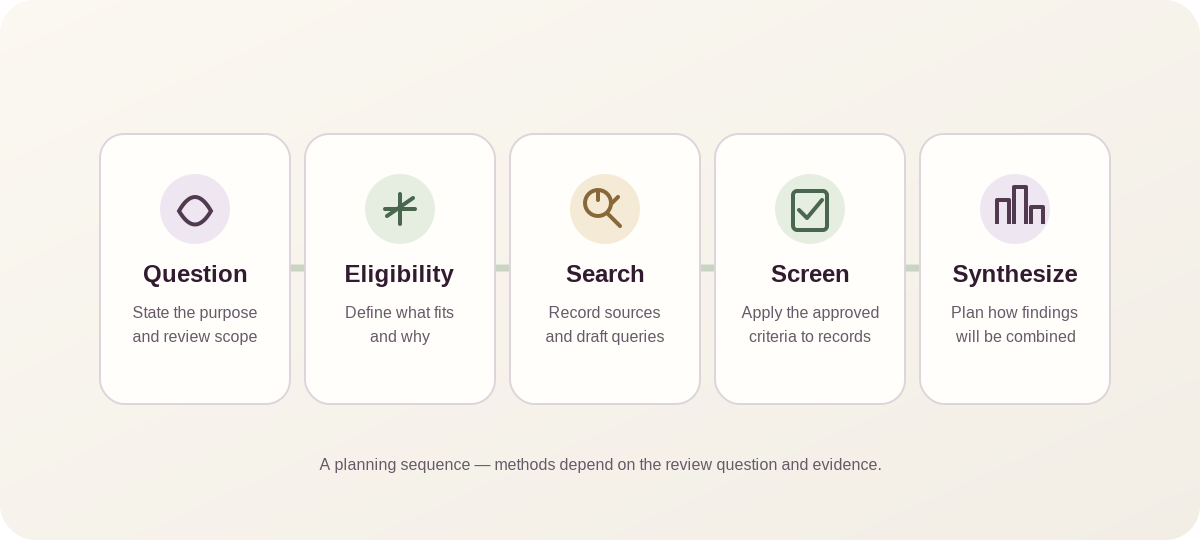
A protocol records important decisions before study selection and synthesis begin. Define the question and objective, eligibility boundaries, planned information sources and search approach, record-management process, selection stages, data collection, and synthesis method. These choices should fit the review question and the type of evidence; a fixed PICO form or a planned meta-analysis is not right for every review.
The planner offers different prompts for systematic-review protocols, scoping-review planning, and other or undecided review types. The first option draws on PRISMA-P 2015, which was published to support development and reporting of systematic-review protocols. PRISMA-ScR is a reporting extension for scoping reviews. Neither selection turns this worksheet into a compliance assessment or establishes that a particular method is suitable.
How the planner works
Choose an approach, give the review a working ID and protocol version, and mark each prompt as undecided, planned, described or not applicable. Add a short reason for a not-applicable decision. The status summary counts entries; it is not a percentage, quality score or pass/fail judgment. “Described” means you entered a description, not that it has been reviewed or approved. Download a JSON working file to preserve all entered prompt answers and metadata for another session. Import previews the selected file, then replaces the current tab only after confirmation.
The Markdown export includes your entries and items that still need attention. The JSON working file preserves the selected approach and planner responses for later editing; it is different from the smaller screening setup. The separate screening setup contains only the review ID, version and criterion IDs with their labels. It can seed the screening log after you inspect and apply it. The protocol remains the authoritative plan; the screening log records how the team applied the current version. The transfer does not add screening decisions or empty record rows.
Adapt and review the draft
Before screening, have the appropriate review team member or information specialist inspect the question, eligibility rules and search strategy. Confirm the review type, any relevant reporting extension, local registration requirements and the source coverage that fits the question. Cochrane’s protocol guidance distinguishes searching, selection, data collection, critical appraisal and synthesis; the exact methods depend on the review and discipline.
When the plan changes, record the date, what changed and why, and preserve the earlier version according to your review procedure. Do not rewrite the history of a decision after seeing how it affects included results. The planner does not register or publish your protocol, assess risk of bias, verify database coverage, calculate review results, or determine compliance. Do not enter confidential or participant-level information.
Questions about this topic
Does this tool create a PRISMA-compliant protocol?
No. It organizes planning prompts and drafts a file from your entries. It does not determine whether your protocol is complete, your method is suitable, or your work complies with PRISMA, PRISMA-P, PRISMA-ScR or another standard.
Should a scoping review use the PRISMA-P prompts?
PRISMA-P is for systematic-review protocols. PRISMA-ScR is an extension for reporting scoping reviews. Choose the scoping-review prompts here, then check current scoping-review methods and reporting guidance for your discipline.
Do all reviews need a PICO question or meta-analysis plan?
No. PICO is useful for some intervention questions but not a universal frame. A review may use another framework and may synthesize evidence without meta-analysis. Select and justify methods suited to the review question.
What does the screening setup download contain?
It contains the review ID, protocol version, selected planning approach and criterion IDs with labels. The screening log previews that metadata before applying it to blank review and criterion fields; it does not add record rows or screening decisions.
Are my protocol answers saved or uploaded?
They are not uploaded. Local saving is off by default; if you opt in, the working plan is stored in this browser profile until you turn saving off or clear the plan. Anyone using the same profile may be able to access it, so avoid shared devices. Download a Markdown draft for reading or a JSON working file to continue editing later. Import shows a summary before replacing the current tab, and only applies the file after you confirm. Review exports before sharing.
Can I submit the Markdown file as my registered protocol?
Not without review. It is an editable working draft, not a registry submission or a journal-specific manuscript. Check your chosen registry, reporting guidance, review-team decisions and institutional requirements.
Sources and editorial notes
The supporting reading below informs our editorial guidance. Exercises and scenarios illustrate a method; they do not report a completed product test or measured learning outcome. Read our editorial policy or send a correction with a supporting source to info@ai-essay.com.
- PRISMA statement: Protocols and PRISMA-P checklist
- PRISMA-P 2015 checklist
- PRISMA statement: Scoping Reviews (PRISMA-ScR)
- Cochrane: How to write a Cochrane protocol
- Cochrane Handbook: Starting a review and protocol development
- Cochrane Handbook: Scope and review questions
- Cochrane Handbook: Eligibility criteria and synthesis groups
- PRISMA statement: Extensions for other review types