 AI Essay

On this page
Build a book, journal article or web-page citation
For a book, enter the author names as a reference-list element, one per line: invert the first name (for example, “Yu, Charles”) and keep later names in normal order. Add the publication year, title and publisher. An edition is optional. The place of publication is not requested.
For a journal article, add the article title, journal, year, volume, optional issue, and complete page range or article number. For a web page, add its containing site, URL and publication or revision year. If the page has no publication or revision date, use n.d. and include the date you accessed it.
Enter the in-text author key separately as it should appear before the year. For example, “Yu,” “Binder and Kidder,” or “Snyder et al.” This avoids guessing how a group name, compound surname or multiple-author rule should be shortened.
Match the in-text citation to its reference entry
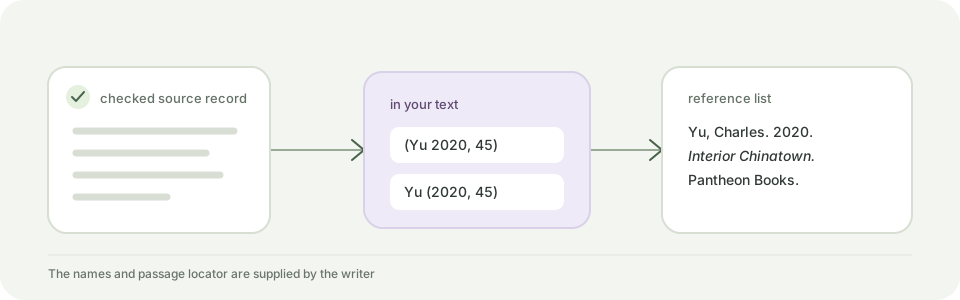
The builder returns both a parenthetical form, such as “(Yu 2020, 45),” and a narrative form, such as “Yu (2020, 45).” The optional locator is supplied by you and appears after a comma. Check that the author key, year and page or section actually identify the work and passage you used.
The reference output retains the capitalization and name order you enter. It does not sort a complete list, assign year suffixes for same-author same-year works, infer sentence case, verify that a DOI exists, or decide whether your source belongs in a reference list. Review the official example for your source and course requirements before pasting it into a paper.
Keep citation details in this browser
The examples are generated in the current browser tab. The tool does not send or save the names and source details you enter. Clear the fields when you finish, especially on a shared device.
Free Chicago 18th-edition tool
Build matching Chicago Author-Date citations
Choose a supported source and add the author key, year and details checked against its record. The parenthetical citation, narrative citation and reference entry update in this browser.
Invert the first author’s name, such as “Yu, Charles”; enter later names in normal order. For an organization, use its full name as one line.
The first-author key is entered separately so the tool does not guess at compound surnames or organization abbreviations. Enter a DOI, URL or database only when it appears in the source record; do not enter a catalog or purchase page for a print book.
Questions about this topic
Does this build both Chicago in-text forms and the reference entry?
Yes. For a supported book, journal article or web page, it builds a parenthetical citation, a narrative citation and a matching Author-Date reference entry from the details you supply.
Is this Chicago’s Notes and Bibliography system?
No. This tool formats the Author-Date system. Chicago Notes and Bibliography uses numbered footnotes or endnotes and is covered by the separate notes builder.
Which Chicago source types are supported?
Authored books, journal articles and web pages with a named individual or group author. Chapters, reports, dissertations, newspapers, social posts and sources with no named author are outside this version.
Does the generator check my source or DOI?
No. It formats only the details you enter. It does not search for or verify a source, resolve a DOI, check page numbers or evaluate whether the source supports your claim.
What should I enter for an undated web page?
Use n.d. for a page without a publication or revision date and enter the date you accessed it. Check the current Chicago example and your course instructions before using the entry.
Are my details uploaded?
No. Citation examples are generated in your browser and the tool does not upload or save the text you enter.
Sources and editorial notes
The supporting reading below informs our editorial guidance. Exercises and scenarios illustrate a method; they do not report a completed product test or measured learning outcome. Read our editorial policy or send a correction with a supporting source to info@ai-essay.com.