 AI Essay

On this page
Local research-data tool
Describe the files in a research dataset
Draft a reader-facing README for a research collection. Identify what each file contains, how files relate, which version the notes describe and what a repository reader should check before reuse.
Review details from the preparation log
Only the dataset label and current version are passed into this README draft. Log events, notes, counts and dataset rows are not included.
README preview
What a dataset README is for
A dataset README gives readers an orientation to a collection: what it covers, which files are present, how the files connect, what version the notes describe and where the supporting documentation belongs. It works at the collection level. A data dictionary explains variables or codes; a processing log records changes between versions. A README can point to both without replacing them.
Repository fields vary. UK Data Service guidance lists collection metadata such as study description, creators, methods, coverage, access, reuse and file formats. Its data-level guidance separately asks that documentation explain file contents, identifiers, organization, relationships, transformations and missing or incomplete material. Adapt this draft to the repository and discipline you actually use; it does not implement any one repository’s required schema.
Describe the collection without overstating it
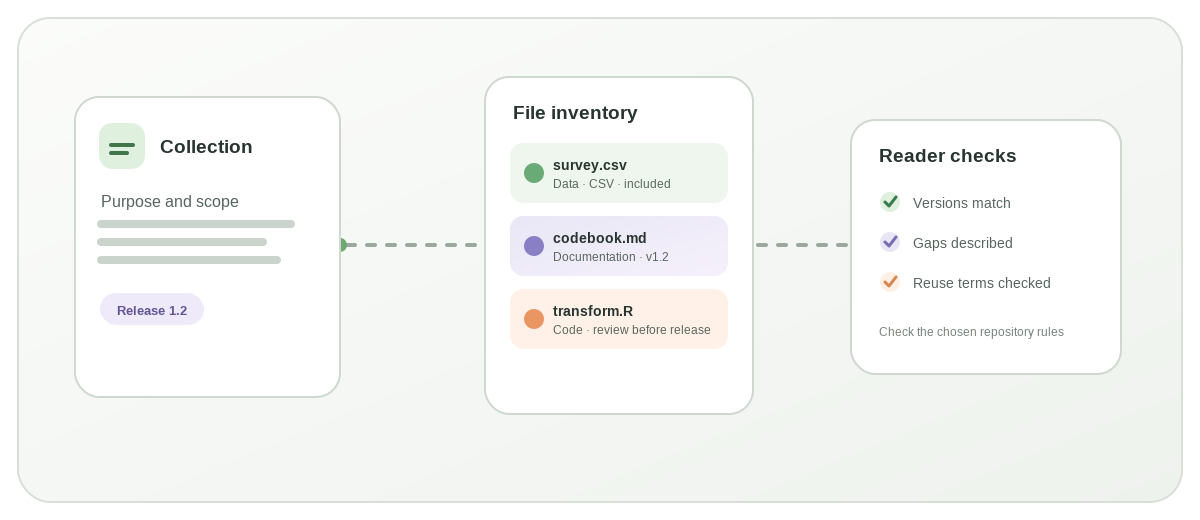
State the purpose, source, unit of observation, collection method and documented time or geographic coverage. Explain whether files represent the same release, different waves, linked instruments or separate materials. Write for someone who was not on the research team and distinguish what the files contain from what a future analyst might infer.
Keep details at a level that is safe to share. A README should not expose participants, confidential locations, access credentials, private file paths, unapproved contact details or information that could increase disclosure risk. UK Data Service guidance treats privacy, anonymisation, access control, rights and reuse conditions as connected governance questions; a description alone does not resolve them.
Make the file inventory useful
For each item, add a short file label, role, format and version. Note whether it is included, partial, not included or still to confirm. Where relevant, add a repository-approved identifier, size or technical detail such as media duration, image resolution or a spatial reference system. Explain relationships such as “instrument used to create survey-wave-1.csv” or “syntax reproduces the recode in release 1.1.” Avoid raw private paths.
A structured file list helps a reader see the collection’s scope before opening individual items. UK Data Service guidance recommends explaining what each file contains, how items are identified, how files relate and how missing or incomplete material is represented. The right technical detail depends on the data type and repository; these optional prompts are examples, not a universal metadata schema.
Keep the README aligned with the release
Give the README and files a version label and check that processing notes and dictionary references describe the same release. If the package changes, update the inventory and retain prior documentation according to project and repository rules. ICPSR describes curation as work across data and accompanying documentation; repository review remains a separate process from writing a README.
Before export, compare each file label and status with the actual release package. Confirm that the repository’s current metadata, citation, licence, access and review requirements have been checked by the responsible team. A completed README is documentation, not evidence that the data are complete, shareable, de-identified, legally cleared or accepted by a repository.
Use the local dataset README builder
Enter a non-sensitive collection title and short file labels, then describe the study purpose, files, methods, processing, quality checks, gaps, access and reuse conditions. Add optional identifiers, file sizes and type-specific technical notes where appropriate. Preview and download an editable Markdown README, or export a JSON backup to continue in another session. The fields are prompts, not a deposit checklist or repository-specific metadata schema.
The worksheet runs in the current browser tab. It does not inspect, load or upload dataset files; check a repository schema; validate rights, consent or anonymisation; assess disclosure risk; certify data quality; or save entries automatically. Do not enter participant information, raw data, private paths, credentials or details you are not permitted to store here. Review the README under your project’s data-management and access rules before sharing.
Questions about this topic
What should a research dataset README include?
Typically it identifies the collection and version, explains its purpose and scope, lists files and formats, describes relationships and documented methods, notes processing or gaps, and explains access and reuse conditions. The exact fields depend on the repository and data type.
Is a README the same as a data dictionary?
No. A README or manifest explains the collection and how its files fit together. A data dictionary explains variables and coding inside a dataset. A processing log describes changes made between dataset versions.
Does this builder make my data ready to deposit?
No. It creates editable documentation only. It cannot inspect the files, assess consent or disclosure risk, verify rights, test quality or meet a repository’s requirements automatically.
Does the tool upload or save my files?
No dataset files are accepted or uploaded. The text you enter stays in the current browser tab until you download it; it is not automatically saved. Review any export before storing or sharing it.
Should I use this README for any repository?
Use it as a starting draft, then check the repository’s current instructions and metadata fields. Different repositories and data types can require different formats and review steps.
Sources and editorial notes
The supporting reading below informs our editorial guidance. Exercises and scenarios illustrate a method; they do not report a completed product test or measured learning outcome. Read our editorial policy or send a correction with a supporting source to info@ai-essay.com.