 AI Essay
On this page
Free browser tool
Build a multiple-choice question bank
Create reviewed single-best-answer items, then select a set for separate student and teacher exports.
Nothing is uploaded. Current edits stay in this tab. Enable local saving only if you want a reusable bank on this browser.
Your local bank
0 questions
Export selected questions for Moodle
The Aiken text file includes answer keys. Treat it as a teacher-only import file. It does not include rationales or source notes.
Select questions to check whether they fit the Aiken format.
In Moodle, open the question bank import tool, choose Aiken, select a category and import the file. Then check the imported stems, options and answer keys in your own course. Interface labels can differ by Moodle version and permissions.
Prepare a blank item-analysis starter pack
Choose at least two questions for a ZIP with a blank response CSV, a separate answer-key line and a question-order map. The files contain no learner responses; add only anonymous option labels after the assessment.
Select at least two questions. The pack follows bank order.
Use the CSV headers to record each person’s selected option. Keep names, student IDs and roster data out of the matrix, then paste the separate key into the item-analysis calculator. Check the key and item order before calculating.
Your bank is empty. Add a question or import a backup.
Build a reusable multiple-choice question bank
Write a focused stem, add two to six labelled options, select one answer and record why it is best. Add a learning objective and a source or locator so you can check the item against the material it is meant to assess. The builder validates the record structure; it does not decide whether an answer is factually correct or whether an item is fair.
The question editor stores no content on our server. Your current work stays in the tab. If you want a persistent bank, turn on local saving; saved items remain in this browser’s local storage. Export a JSON backup before clearing site data, moving devices or switching browsers. Import accepts this builder’s versioned JSON format.
Export student copies, a teacher key or Moodle questions
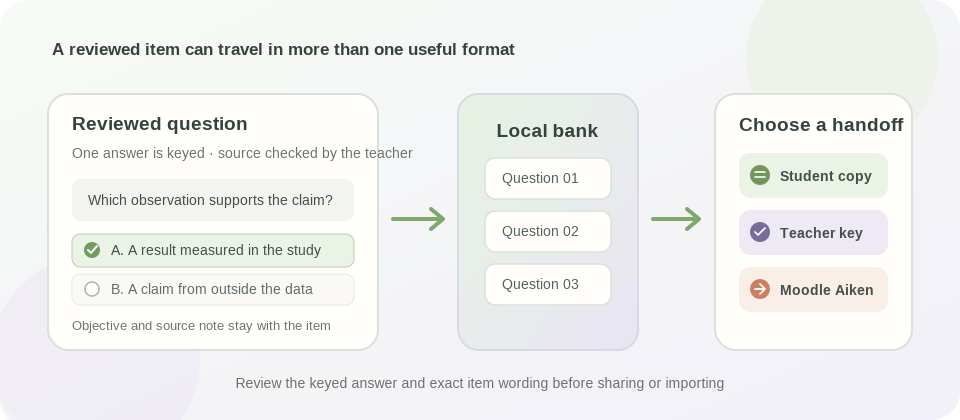
Select questions to download a ZIP with two separate UTF-8 text files: a student copy with stems and options, and a teacher key with correct answers, rationales, objectives and source notes. Check both files before sharing; the formatter cannot verify that the answer key matches the latest question wording.
For later item analysis, select 2–200 questions to prepare a separate starter ZIP: a CSV with Q1, Q2 and other item headers, a one-line answer key you can paste into the item-analysis calculator, and a question-order map linking each Q number to its stem and keyed choice. The CSV contains headers only; it intentionally has no sample or learner-response rows. After an assessment, add one anonymized response row per participant and blank cells for omissions; do not add names, IDs or roster fields. The order follows the bank, not the order in which you selected the questions.
For a Moodle question bank, you can also export the selected single-best-answer questions as a teacher-only Aiken text file. Aiken carries the stem, options and answer letter, but not the rationale, source note or category. Keep the teacher key and JSON backup for those details. Import Aiken through your Moodle question bank, choose the category, and inspect the imported questions and answer keys before using them. Moodle’s import controls can vary by version and course permissions.
The Aiken file is plain UTF-8 text, not a Word document. Moodle’s documented format requires a one-line question stem. Each answer choice begins with an uppercase letter followed by a period or right parenthesis and a space; the correct-answer line immediately follows in the form `ANSWER: A`. This exporter writes periods and uppercase answer labels. It checks that stems and answer choices fit on one line and writes the file in UTF-8. Moodle warns that some non-ASCII characters can still cause import errors, so inspect the imported text and correct answer in your own course. Moodle recommends XML when you need richer question data such as feedback; this builder does not create Moodle XML, upload directly to a course, grade responses or analyze student performance. Use the exam blueprint to plan coverage and the item-analysis calculator after you have response data.
Write a defensible single-best-answer question
Start with the learning objective and decide what evidence in a student response would show it. Carnegie Mellon’s Eberly Center recommends aligning assessment methods with learning objectives; Cornell’s test-question guidance explains how a clear stem and plausible alternatives support a question that assesses the intended knowledge. Keep the problem in the stem, make options parallel, and check that only one option is best under the conditions you stated.
Before reusing an item, solve it without looking at the key, verify the answer and rationale against the cited course material, and ask whether a prepared learner could defend another option. Review distractors individually: each should represent a plausible misconception or reasoning error, not a trick based on wording. The checked box records your own action only; it is not an independent review, validation score or approval.
Keep the bank private and understand its limits
Use fictional or de-identified course labels if the bank will be shared between devices. Do not enter student names, grades, live examination content or restricted course material. Local browser storage is not encrypted collaboration or a backup service; anyone with access to this browser profile may be able to access its saved bank.
The tool does not create questions with AI, detect ambiguity, validate sources, verify keys, measure difficulty or guarantee alignment to a curriculum. A correct radio selection only means the record contains one selected option. Check the item with the course material and applicable assessment rules before use.
Questions about this topic
Can I create a multiple-choice question bank for free?
Yes. This browser tool lets you create a local bank of teacher-written questions, organize it with search, select items and export JSON backups. It has no account or server-side bank.
Does the student export include the answer key?
No. The download contains separate student and teacher files. The student copy includes stems and options; the teacher key includes the keyed answers, rationales, objectives and source notes.
Can I prepare an item-analysis response file?
Select at least two bank questions to download a starter ZIP with Q1… item headers, a separate answer-key line and a question-order map. The response CSV is header-only; add anonymous participant response rows after the assessment. It contains no student results or identifiers.
Can I import questions into Moodle?
The selected questions can be exported in Moodle Aiken text format for teacher import. The Aiken file includes one-line stems, answer options and answer letters, but not rationales or source notes. Import it into a Moodle question bank, then inspect the questions and keys. Moodle recommends XML for richer question data; this tool does not create Moodle XML.
Are my questions uploaded or automatically saved?
No. The editor works in your browser tab. Bank saving is optional and must be enabled; when enabled, the bank uses this browser’s local storage. Download JSON to keep a portable backup.
Can this tool verify that my answer is correct?
No. It checks that a saved question has a stem, two to six options and one selected option. You must verify the key and rationale against the original course material.
Can I export questions to an LMS or QTI?
You can export selected single-answer questions as a Moodle Aiken text file for a teacher to import into a Moodle question bank. The tool does not export Moodle XML or QTI and does not upload questions directly to an LMS.
Sources and editorial notes
The supporting reading below informs our editorial guidance. Exercises and scenarios illustrate a method; they do not report a completed product test or measured learning outcome. Read our editorial policy or send a correction with a supporting source to info@ai-essay.com.