 AI Essay
On this page
Choose the appraisal method before entering judgements
A risk-of-bias assessment depends on the review question, study design, outcome and effect being examined. Select the method specified in your protocol and consult its current guidance and official form. This workspace does not implement RoB 2, ROBINS-I, ROBINS-E, ROB ME or another appraisal instrument. It does not reproduce signalling questions, apply a scoring algorithm, recommend a judgement or decide whether a result is trustworthy.
The labels used by appraisal tools are not interchangeable. Enter the exact method name and version, and use your review’s own domain names and judgement terms. If the method changes, retain the previous protocol and assessment file, document the reason for the change, and follow your team’s procedure for reassessing affected results.
Identify the result, not only the study
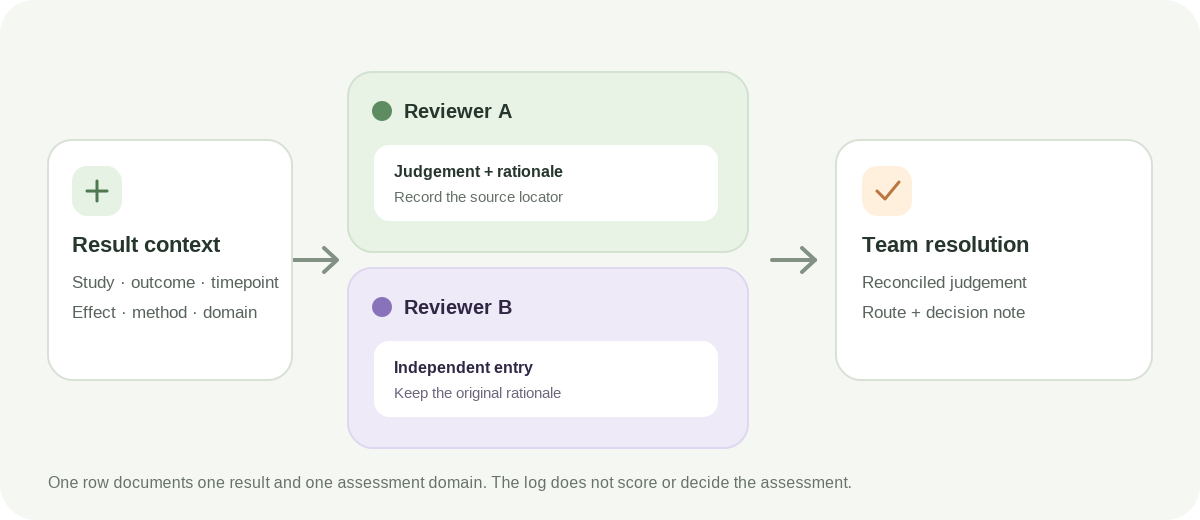
A single study can report several outcomes, timepoints, analyses and effect estimates. Cochrane’s guidance for RoB 2 describes assessment of a specific result and notes that one trial may therefore require multiple assessments. Record the study and report IDs alongside the outcome, timepoint and effect of interest so a later reader can see exactly what each row covers.
Use one row for each result-by-domain judgement. Keep separate outcomes or analyses in separate rows when your chosen method requires them. A study-level summary or one overall score can hide meaningful differences between results; this workspace deliberately does not calculate or display one.
Supporting reading: [1]
Keep reviewer judgements and their evidence separate
If your protocol calls for independent review, each reviewer should complete their own assessment before comparing entries. Enter the judgement, a concise rationale and all information sources that informed it, with locators such as report pages, tables, figures, registry entries, supplements or correspondence. This browser worksheet stores both entries together for documentation; it does not provide separate accounts or conceal one reviewer’s fields from the other. Arrange independent assessment outside this shared view if your method requires it.
A citation or source locator is not a substitute for reading the evidence in context. Record the sources that informed the judgement according to your team’s data-handling rules. Do not paste participant-level or confidential material into this worksheet.
Document disagreement without erasing the original entries
When reviewer judgements differ, retain both original values. Enter the resolution route specified in the protocol, the reconciled judgement and a short explanation of how the decision was reached. A resolved label without a note hides the process; a note without an outcome can leave the review record unclear.
The workspace flags only differences between the two entered text labels and whether the resolution fields are blank. These are completeness prompts, not methodological evaluations. Matching labels do not establish that the assessment is correct, and different labels are not automatically errors.
Use the local result-by-domain log
The form below keeps the review and protocol identifiers, study and report IDs, result context, method and version, domain, two reviewer entries and the team’s resolution in one editable row. Add only fields needed by your protocol. Entries remain in this browser tab unless you explicitly enable saving in this browser profile. Export JSON for a working backup or CSV for a spreadsheet; both include the assessment entries you entered.
Keep the review file under your team’s access controls. The workspace holds up to 500 rows per file, but it is not a shared database, a validated assessment system, an evidence repository or a compliance check.
Local review documentation
Record risk-of-bias assessments by result
Use one row for each result and domain in your selected appraisal method. Preserve the method, result context, source locators, separate reviewer entries and the team’s resolution.
Stored locally in this browser when enabled. Nothing in the assessment fields is uploaded by this worksheet. Saving is off by default. If you opt in, other people or software with access to this browser profile may be able to see the saved copy.
This is a documentation workspace, not an appraisal instrument. It does not implement RoB 2, ROBINS-I, ROBINS-E, ROB ME or another tool, and it does not produce scores or judgements. Use the current authorized method and follow your protocol.
Local saving is off. Download a JSON backup to keep your work after leaving this page.
Review the log status
These counts describe entered fields only. They do not judge assessment quality, correctness or agreement beyond matching the text labels.
Review the selected working file
Confirming replaces the current rows. Nothing changes until you choose to continue.
Add one row per result and domain. No assessment has been entered.
Fictional example: two reviews of one outcome
A constructed row might identify Review SR-01, Study S-04, Report R-04, the outcome “reading comprehension,” and the follow-up “end of term.” Reviewer A records “Low” with a methods-page locator; Reviewer B records “Some concerns” with a different passage. The team keeps both entries, documents the protocol’s discussion route, and records its reconciled decision and rationale. The names, labels and details are fictional and are not a completed study assessment.
Questions about this topic
Is this a RoB 2 or ROBINS-I calculator?
No. It is a method-neutral documentation log. It does not reproduce any instrument, apply signalling questions, run an algorithm or assign a risk-of-bias judgement. Use the current official method and its authorized form.
Should I assess an entire study or each reported result?
Follow the method in your protocol. Cochrane’s RoB 2 guidance focuses on a specific result and outcome; a study may contribute multiple results. Record enough identifiers to keep each assessment’s scope clear.
Can two reviewers use this as a blinded independent workflow?
No. Both entries are visible in the same browser worksheet. If your method requires independent or blinded assessment, collect judgements separately and enter them here only when your protocol permits comparison.
Does the summary decide whether a disagreement is resolved correctly?
No. It only counts differing text labels and checks whether a reconciled judgement and note are present. Your review team must follow its protocol and justify the final decision.
Are my entries sent to a server?
The assessment fields stay in the current browser tab unless you opt in to saving them in this browser profile. Downloaded files are created in your browser. Do not use shared devices for sensitive review notes, and follow your institution’s storage rules.
Sources and editorial notes
The supporting reading below informs our editorial guidance. Exercises and scenarios illustrate a method; they do not report a completed product test or measured learning outcome. Read our editorial policy or send a correction with a supporting source to info@ai-essay.com.