 AI Essay
On this page
Free, local semester planner
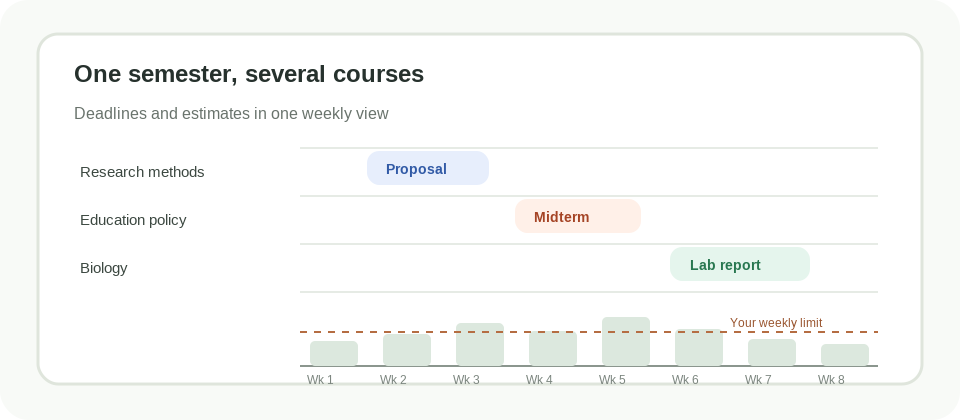
Map deadlines across your courses
Add course assessments, when you plan to start and your estimated work time. The planner will group deadlines and show your estimates by week.
Runs in this browser tab. Calendar files are read locally; descriptions, attendees and other event details are ignored. No account connection, automatic saving or server submission. Verify dates against your current course source.
Review saved plan
Applying this file replaces the values currently in the form. The preview does not change them.
Select calendar due dates
Applying selected events appends draft assessment rows. Imported rows contain only the title and due date; enter and check the course, start date and your estimated hours before building the plan.
Your weekly overview
| Week of | Assessments due | Estimated hours | Your weekly limit |
|---|
Review progress and replan
Choose a review date, then enter each assessment’s current status and your estimate of the hours still needed. The original estimate stays available for comparison.
Original estimate and revised remaining work
| Week of | Assessments due | Original estimate | Revised remaining estimate | Your weekly limit |
|---|
Hours are spread evenly over each assessment’s entered start-to-deadline dates. A replan uses only your remaining-hours estimates from the review date onward. Due-date events in the calendar file are all-day events; no study blocks are generated.
Bring every course deadline into one view
Start with the assessment and exam dates in each current course outline. You can enter them manually or preview an exported iCalendar (.ics) file from a course calendar. The importer reads event titles and dates locally, lets you select eligible all-day events, and adds only the title and due date as draft rows. Timed and recurring events are set aside for manual review because calendar timezone and recurrence rules need context. Verify every selected date against the course source.
For each draft row, add the course, the date you expect to begin, and your own estimate of the effort you will need. Imported events do not supply those planning judgments. The weekly map spreads each estimate evenly across its start-to-deadline dates. That is a visible planning assumption, not a prediction of how long the work will take; change your dates or estimates to match the way you actually expect to work.
The University of Melbourne recommends placing all assessment and examination dates in a semester overview so students can identify deadline-heavy periods and spread work in advance. The University of Waterloo describes working backwards from a deadline, breaking an assignment into manageable tasks and leaving room for unexpected challenges. Use this tool to coordinate courses, then use the linked assignment planners to develop one assessment in detail.
Read the weekly workload as an estimate
Set a weekly study-hours limit that reflects the time you are willing to plan for course work. A week above that number means only that the estimates you entered exceed your own planning limit. A week with several due dates can still be demanding even if its estimated hours look modest; use both the deadline count and hours to decide what to review.
The map does not know your class schedule, employment, care responsibilities, energy, grading weights or the real complexity of an assignment. It does not distribute work into daily calendar slots or infer a score. Leave room for rest and commitments by lowering your available hours, adjust the estimate as the task becomes clearer, and revisit the plan each week. During a review, set each task’s status and your own remaining-hours estimate. The revised view spreads those remaining hours from your chosen review date to the original due date; it does not measure time already spent or predict actual effort.
Keep your plan and choose what to export
The planner runs in this browser and does not upload or automatically save course names, assessments or dates. Calendar import reads the selected .ics file in the current tab and ignores descriptions, attendees and other calendar fields. Download a versioned JSON file if you want to reopen and revise the same plan later. CSV exports include the original weekly estimate; after a review, a separate revised CSV also includes your entered progress, remaining hours and future-week comparison. Its calendar export creates all-day due-date events only; it does not add suggested study sessions. Inspect a downloaded file before sharing it, especially if course titles or dates are sensitive.
Questions about this topic
How does the planner calculate work for each week?
For each assessment, it divides your estimated hours evenly over the calendar days from the start date through the due date, then totals the portions that fall in each Monday-to-Sunday week. This is a transparent estimate based only on dates and hours you enter, not an optimal schedule or a measure of actual effort.
What does “over my weekly limit” mean?
It means the hours allocated from your entered estimates exceed the weekly capacity you set. It is a prompt to review the estimates or plan; it does not mean the week is impossible or that the planner knows your full schedule.
Can I import due dates from a course calendar?
You can preview an exported .ics calendar in this browser, select eligible all-day events and add their titles and due dates as draft rows. Timed and recurring events need manual review. You must verify imported dates and enter each course, start date and work estimate before building the workload map.
What goes into the calendar file?
The calendar export contains all-day events for the due dates you entered, with the course and assessment in the event title. It does not add study blocks, reminders or estimated-duration events.
Can I review progress and replan each week?
Yes. After building the first overview, choose a review date and enter a status and remaining-hours estimate for each assessment. The revised view distributes only those remaining hours from the review date through the entered due date. Incomplete past-due work is shown separately and is not assigned a new deadline.
Can I save a plan and reopen it later?
Download the JSON plan file, then use Open a saved plan to select it later. The planner previews the file before you choose to replace the current form. It does not save to a server or automatically store your entries.
Sources and editorial notes
The supporting reading below informs our editorial guidance. Exercises and scenarios illustrate a method; they do not report a completed product test or measured learning outcome. Read our editorial policy or send a correction with a supporting source to info@ai-essay.com.