 AI Essay

On this page
Free browser-based study tool
Build a map from connected ideas
Write each relationship as a complete proposition. The tool arranges the diagram; you decide what the concepts mean and whether each connection is supported.
Enable JavaScript to build a map. Your entries stay in this browser tab.
Review the map
Your concept map
Recall the links
Hide each linking phrase, write your explanation, then reveal the phrase to compare. This is a self-check, not an automatic score.
Read each connection
Files are read in this tab and are not uploaded.
Your map and practice responses remain in this tab. Nothing is saved automatically or sent to a server.
Show how ideas connect, not just which ideas you know
A useful concept map names the ideas and makes the relationships between them explicit. Carnegie Mellon’s Eberly Center describes concepts joined by lines and linking words that specify the relationship. Cornell’s Learning Strategies Center likewise recommends adding linking terms rather than leaving connections implicit. The tool helps you record those propositions; it does not decide whether your explanation is accurate.
Start with one focus question, choose a small set of course concepts, and connect them with phrases you can explain. Include a source locator when a relationship depends on a particular lecture, reading or page. Revise the wording when a link is vague, circular or broader than the source supports.
Build and review a concept map
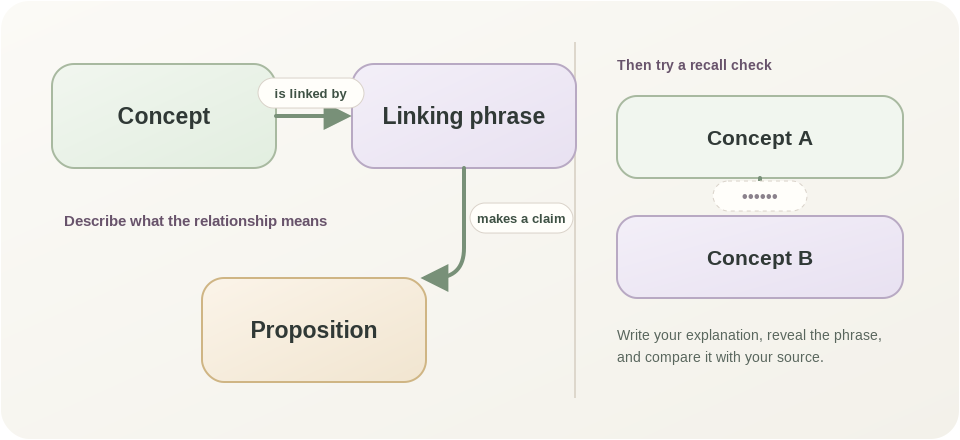
Enter a focus question and three to fifteen concepts. Add each relationship as a directed statement: a starting concept, a linking phrase and a connected concept. A note or source locator is optional. The map is arranged automatically, while the form remains the editing surface; no drag-and-drop precision or mouse-only interaction is required.
The diagram and proposition list present the same entries in different forms. Review each arrow and phrase against your own notes. Warnings can flag a concept with no links or repeated entries, but they do not score your map or diagnose a misconception.
Practice recalling the relationships
Hide the linking phrases, write your own explanation for a connection, then reveal the original wording and compare the two yourself. The tool does not mark a response right or wrong: two accurate explanations can use different language, and similar phrasing does not prove that the underlying relationship is sound.
For another retrieval step, close the map and explain the answer to your focus question from memory. Reopen the sources when a connection is uncertain, correct the map if needed, and try again later. This is a study routine, not a promise of a learning outcome.
Supporting reading: [3]
Export a copy and keep your source trail
Download a JSON copy to continue editing in another session, a self-contained SVG to place in a document, or a plain-text list of propositions. The tool does not automatically save or upload the concepts, links, notes or practice responses. Keep a separate backup if the map matters to your work.
A concept map is an aid to organizing and reviewing ideas, not a substitute for reading the assigned material. Verify the relationship and its scope against the source; follow course rules before sharing a map that contains restricted or identifiable information.
Questions about this topic
What makes this different from a mind-map maker?
This tool records each connection as a directed proposition with a linking phrase, such as “retrieval practice — asks learners to recall — a response.” It also includes a practice view that hides those phrases for a self-check.
Does the tool grade my map or tell me if a relationship is correct?
No. It can flag structural issues such as an unconnected concept or a repeated link. You must check each relationship against your notes, source material and course expectations.
Can I use a concept map for active recall?
Yes. Hide the linking phrases, write how you think each pair of ideas is connected, and reveal the original wording to compare for yourself. The tool does not assign a score or claim that a correct-looking phrase proves understanding.
Is my concept map saved or uploaded?
No. The map is held in the current browser tab. It is not uploaded or saved automatically; download the JSON file if you want to keep an editable copy.
Can I print or edit the map elsewhere?
Download the SVG for a standalone diagram or print the page from your browser. Export JSON for an editable backup that this tool can reopen. Inspect the exported version and keep the source notes you need.
Sources and editorial notes
The supporting reading below informs our editorial guidance. Exercises and scenarios illustrate a method; they do not report a completed product test or measured learning outcome. Read our editorial policy or send a correction with a supporting source to info@ai-essay.com.