 AI Essay

On this page
Free, local Chicago/Turabian formatting tool
Format a student paper
Add assignment details, paste plain-text paragraphs and choose whether to include a separate title page. Download an editable RTF to inspect in your word processor.
Plain text only. Paragraph breaks and citation text stay as entered; styling, tables, images, notes and existing page breaks are not preserved.
Add a Notes and Bibliography page (optional)
The page uses the Chicago Notes and Bibliography layout. Entries are preserved in your input order; the tool does not create, alphabetize or verify them. For Author-Date, prepare the reference list your instructor requests.
Your text stays in this browser tab. It is not uploaded or saved. Check the document against your instructor’s directions before submitting.
First-page preview
Approximate layout · inspect the complete RTF
Your name
Course
Instructor
Submission date
Paper title
Your first paragraph will appear here.
Format a Chicago or Turabian student paper
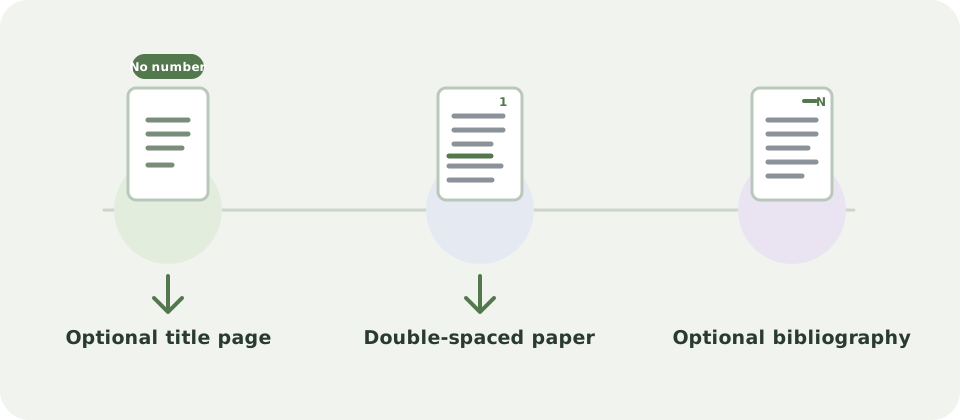
Add the details your instructor requests, paste plain-text paragraphs separated by blank lines, and choose whether the file should start with a separate title page. The RTF uses one-inch margins, a readable 12-point Times New Roman face, double-spaced body paragraphs with half-inch first-line indents, and a live page-number field in the top-right header. When a title page is selected, it has no printed number but is counted as page 1.
These are a practical starting layout based on the official student formatting tip sheets currently published by the University of Chicago Press. The tip sheets identify themselves as Turabian ninth edition and Chicago seventeenth edition; the Press now lists a tenth Turabian edition. The formatter does not claim to implement every edition-specific rule. Follow your assignment, department or dissertation-office instructions first, and inspect the downloaded file in your word processor.
What the formatter preserves and what to check
The paper field accepts plain text and keeps paragraph breaks, including citation text you paste into it. It does not apply citation formatting, create notes, or preserve rich-text styling, formatted headings, tables, images, footnotes, endnotes or existing page breaks. If you add bibliography entries, they go on a separate Chicago Notes and Bibliography page with a hanging indent and remain in your input order; the tool does not create, alphabetize or verify them. It does not make an Author-Date reference list.
A course may request a title page, a different page-number position, an Author-Date reference list or different heading rules. This tool only arranges the text and optional supplied Notes and Bibliography list. Use the Chicago note or author-date tools for supported citation work, then check every note and entry against its source and your class instructions.
Questions about this topic
Does every Chicago student paper need a title page?
No single choice fits every assignment. The official student tip sheets show a title-page layout, but your instructor or institution may ask for a different first page. Use the checkbox only when your instructions call for a separate title page.
Does this tool add Chicago footnotes or endnotes?
No. It keeps citation characters you paste as ordinary text, but it does not style or verify them and cannot preserve footnotes or endnotes. Add and check notes in your word processor or use an appropriate citation tool.
Which Chicago or Turabian edition does it follow?
It applies a limited common page layout informed by the University of Chicago Press student tip sheets, which currently describe Turabian ninth edition and Chicago seventeenth edition. The Press lists a tenth Turabian edition, so confirm any edition-specific rule with your course and the current manual.
Are my paper details uploaded?
No. The preview and RTF are created in this browser tab. This page does not send or save the text you enter.
Sources and editorial notes
The supporting reading below informs our editorial guidance. Exercises and scenarios illustrate a method; they do not report a completed product test or measured learning outcome. Read our editorial policy or send a correction with a supporting source to info@ai-essay.com.