 AI Essay
On this page
Start with the source record, not a citation template
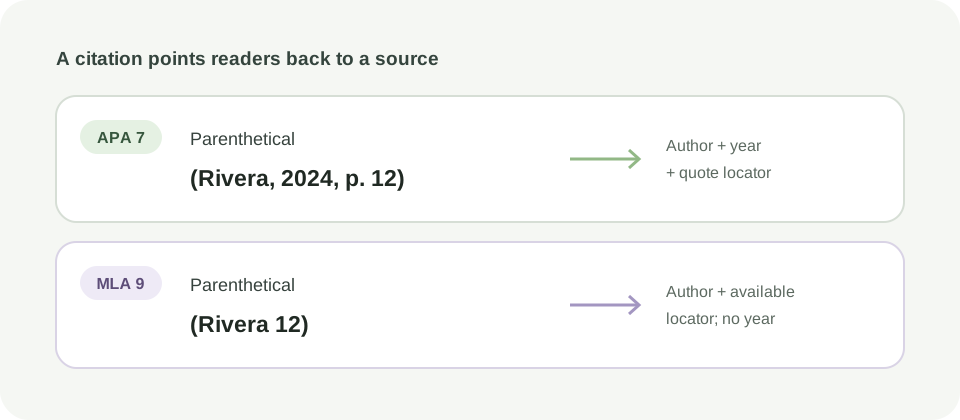
A citation has several separate jobs: identify the work, point readers from a claim to that work, provide enough publication detail to find it, and follow the style and assignment rules. Formatting is only one part of that chain. A polished entry can still describe the wrong edition, copy an incorrect date or point to a source that does not support the sentence.
Choose the required style first. APA 7 uses author–date citations and a References list; MLA 9 keys brief in-text citations to Works Cited entries; Chicago offers two distinct systems—Notes and Bibliography, or Author-Date. Chicago’s own guide says students should check with their instructor before choosing a system. Do not combine the note pattern from one system with the bibliography rules from another.
For an academic article with a DOI, begin with the publisher page or the article itself. Our DOI metadata lookup can retrieve a Crossref record, but registry metadata is a lead to compare, not proof that every field is right. Crossref explains that a DOI query returns metadata deposited for that identifier; verify author order, title, publication details and DOI against the publisher’s version of record. Supporting reading [1].
Choose the matching in-text and reference workflow
Use the course or publisher’s exact requirement to choose one row. A source category alone does not decide which Chicago system or edition your assignment expects.
| Required system | Build the citation or reference | Check and format the document |
|---|---|---|
| APA 7 | APA in-text builder, plus an article or book, webpage or report reference builder. | APA citation–reference checker, References formatter and, when needed, the student paper formatter. |
| MLA 9 | MLA in-text builder and the MLA 9 Works Cited entry builder for a supported book, journal article or webpage; use the MLA Style Center’s examples for other sources. | MLA citation checker, Works Cited formatter and, when needed, the MLA paper formatter. |
| Chicago 18, Notes and Bibliography | Use the Chicago notes builder for supported note and bibliography patterns; compare with the instructor’s required edition. | Use the Chicago notes-and-bibliography checker to review possible links between pasted plain-text notes and entries, then inspect each full citation against the source. |
| Chicago 18, Author-Date | Use the Chicago Author-Date builder to pair common in-text examples with reference-list entries. | Check author and year in both places, then verify the full entry and any locator against the source and the Chicago Citation Quick Guide. |
APA and MLA both link in-text citations to complete source entries, but their keys and punctuation are different. Chicago Notes and Bibliography uses numbered notes; Chicago Author-Date uses parenthetical author–date citations and a reference list. The official Chicago guide presents these as separate systems, not interchangeable formatting options. Supporting reading [2].
Format the page only after the source details are settled
Enter the details you can locate in the source record. Do not let a generator silently fill a missing author, date, journal, volume, issue, page range or DOI with a plausible guess. For a journal article, compare the citation with the publisher page and the DOI record. For a book, check the title and edition page. For a webpage, identify the page author or organization, exact page title, date if provided, site name and stable URL.
Then use the style-specific reference builder and formatter. A formatter may apply hanging indents, spacing or page layout to text you supply; it does not validate the source or create a missing fact. Our APA and MLA page-formatting tools preserve the entries you provide and explain what they do not check. The APA reference-list formatter and MLA Works Cited formatter are layout steps after source review, not citation validators.
Open the downloaded RTF in the word processor required by your course. Inspect italics, hanging indents, line spacing, page breaks, headings and the final rendered pages. A browser preview or plain-text source cannot show every word-processor or submission-system difference.
Run a two-way match, then inspect the flagged cases
Check in both directions: every borrowed claim should point to the intended source, and every listed source should be used where the style and assignment require it. APA’s official checklist asks whether each in-text citation matches only one reference and whether all listed works are cited. Purdue OWL’s MLA page likewise says every Works Cited entry must correspond to a work cited in the main text. These are useful completeness checks, not a replacement for reading the cited passage. Purdue OWL [3] · APA Style [6].
The local APA checker compares common visible author–year patterns and can flag likely missing, unused, duplicate or ambiguous matches. It does not check every APA pattern, validate punctuation or DOI accuracy, or test whether the source supports your claim. The MLA checker focuses on a limited parenthetical author-and-page subset and author-first Works Cited entries; title-keyed citations, no-author entries and some locator patterns need manual review.
Resolve each flagged item in the original document and record the decision. A checker can miss a citation it cannot parse, and a reported match can still point to the wrong edition or page. A clean result means only that the supported visible keys matched; it does not certify a reference list.
Verify identity, locator and claim in the original source
For each important citation, open the actual source. Confirm that the author and work are the ones you used, the publication or edition details match, and the page, section, paragraph, figure or timestamp points to the passage you mean. Read enough surrounding context to see qualifications and conditions. A DOI that resolves is an identifier, not evidence that an interpretation is supported.
Keep the citation attached to the claim it supports. If a paragraph combines findings from different sources, place the citations where a reader can tell which source supports each statement. Follow your assignment’s rule for quotations, paraphrases, page locators, secondary citations, personal communications and AI assistance; these vary by style and task.
For an AI-suggested reference, locate the source independently before using it. Compare its title, authors and year with the publisher or library record, read the source, and verify the claim. See the claim-to-source verification worksheet for a worked check, and the AI assistance record when your course asks you to report AI use.
A final citation pass you can repeat
- Confirm the required style, edition and any instructor-specific exceptions.
- Open each source and repair the metadata from the source itself.
- Generate or format the in-text citation and full entry in the same system.
- Run the matching checker for its supported subset and manually resolve every flagged or unsupported case.
- Compare cited claims and locators with the original passage.
- Inspect the formatted document and keep the source record with your draft.
Use the APA or MLA match check only as a consistency aid. For the official rules, see the APA checklist, the MLA in-text overview, or the appropriate Chicago system guide. Your assignment or instructor remains the authority when a local requirement differs.
Citation formatting questions
Can a citation formatter verify that a source is real?
No. A formatter rearranges supplied details or page layout. Check the publisher or library record and open the source; DOI metadata can help identify a journal article but still needs comparison with the source.
Do all in-text citations need a matching reference?
Follow the assigned style and task. APA’s student checklist asks writers to match in-text citations to references and remove or cite unused entries. MLA requires Works Cited entries for works cited in the text. Some categories, such as personal communications, have specific exceptions; check the relevant manual and course rules.
Does a clean APA or MLA checker report mean my citations are correct?
No. These local tools compare a limited set of visible patterns. They do not confirm source identity, publication details, formatting across all cases, locator accuracy or whether the passage supports your claim.
Should I use Chicago Notes and Bibliography or Author-Date?
Use the system required by your instructor, discipline or publisher. Chicago documents both as distinct systems and advises students to check with their instructor before choosing.
Can I cite a DOI lookup result directly?
Treat it as metadata to inspect, not as a verified source. Compare its title, author order, date and publication details with the publisher’s page and the article you actually read.
Supporting reading and editorial notes
These official resources inform our editorial guidance. Check the current source and the requirements for your own task.
- Crossref Support: Looking up metadata and identifiers
- The Chicago Manual of Style: Chicago-Style Citation Quick Guide
- Purdue OWL: MLA Works Cited page, basic format
- MLA Style Center: In-text citations overview
- MLA Style Center: Works-Cited-List entries by source format
- APA Style: In-text citation checklist (seventh edition)
The one-sentence rule
If you cannot verify it, explain it, and disclose how it was produced, it is not ready to submit.